For Aion 2DPS, healers and tanksWindows 10 and 11Free

Every hit. Every heal. Every boss.

Bladeglass is a combat meter for Aion 2, for every role. It shows each party member's damage, healing and damage taken in a clean overlay over the game, one boss at a time, and alerts you before world bosses, the Shugo event and when a hidden cube is near.

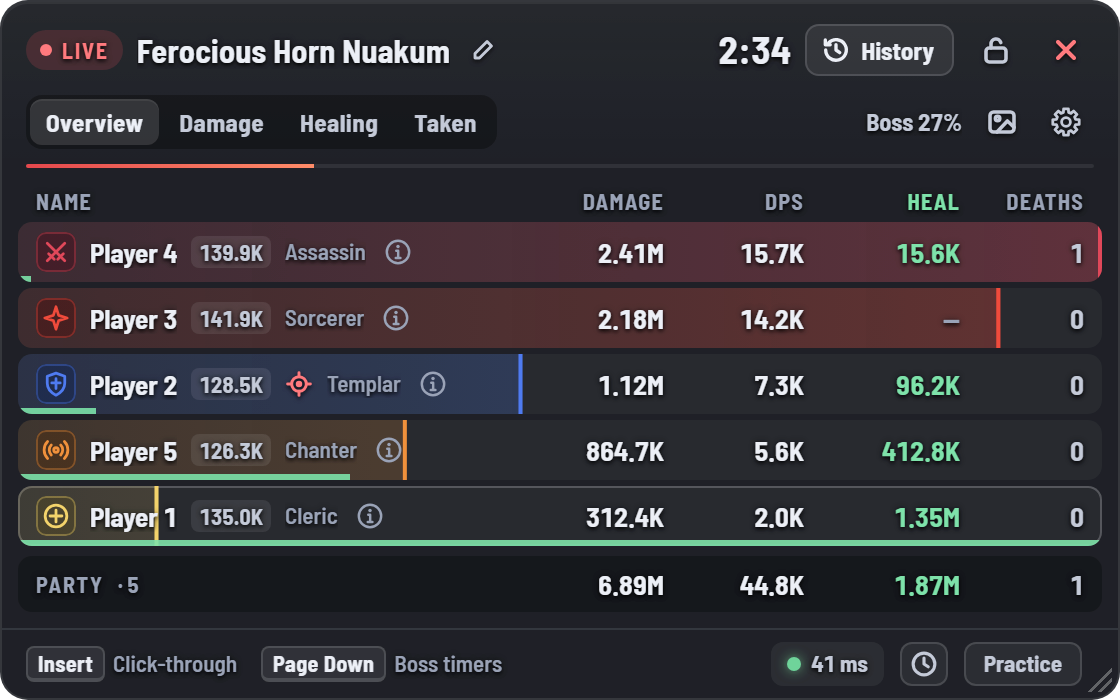
The meter's Overview tab during a boss fight: damage, DPS, healing and deaths for five players of different classes, with a party total
Every roleDamage, healing and tanking
One fight per bossKill or wipe, trash left out
Never miss a spawnBoss, Shugo and cube alerts
Read-onlyNever touches the game
Damage dealers

Damage, skill by skill

Damage and DPS for the whole party. Open a player to see every skill with its hits and its crit, perfect, double and multi-hit rates, counted the way the game's Combat Analysis counts them.

  • Share of the party's damage, per player and per skill
  • Damage over time tagged DoT
  • Overview tab: damage, DPS, healing and deaths side by side
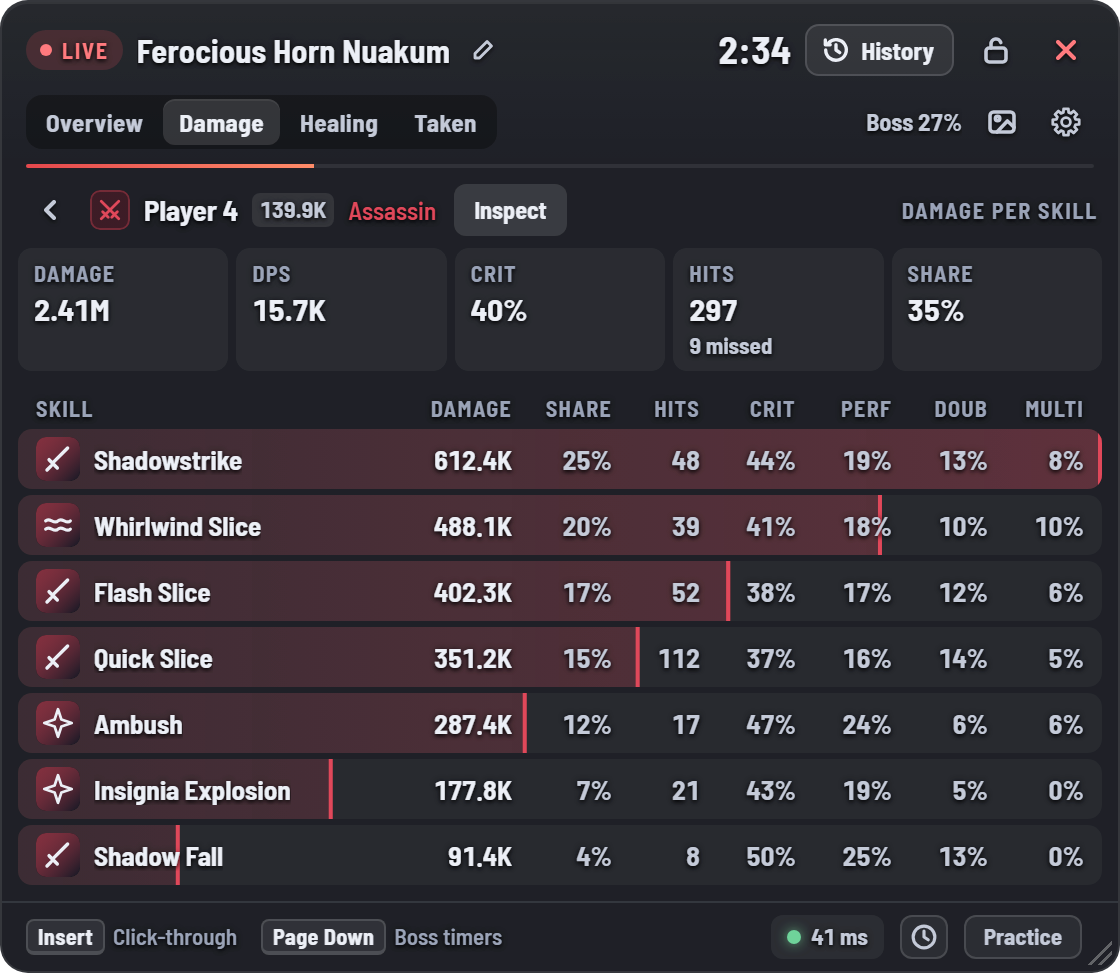
Damage per skill for an Assassin: damage, share, hits, crit, perfect, double and multi-hit rates for seven skills
Healers

Every heal, as it landed

See what each heal really did. Actual heal is the HP truly restored; everything past full HP is overheal.

  • Actual, total and overheal for everyone who heals, with HPS
  • Heal per skill, with heal-over-time ticks tagged HoT
  • Shields counted on their own, credited to the caster
  • Resurrections, and how much healing each member received
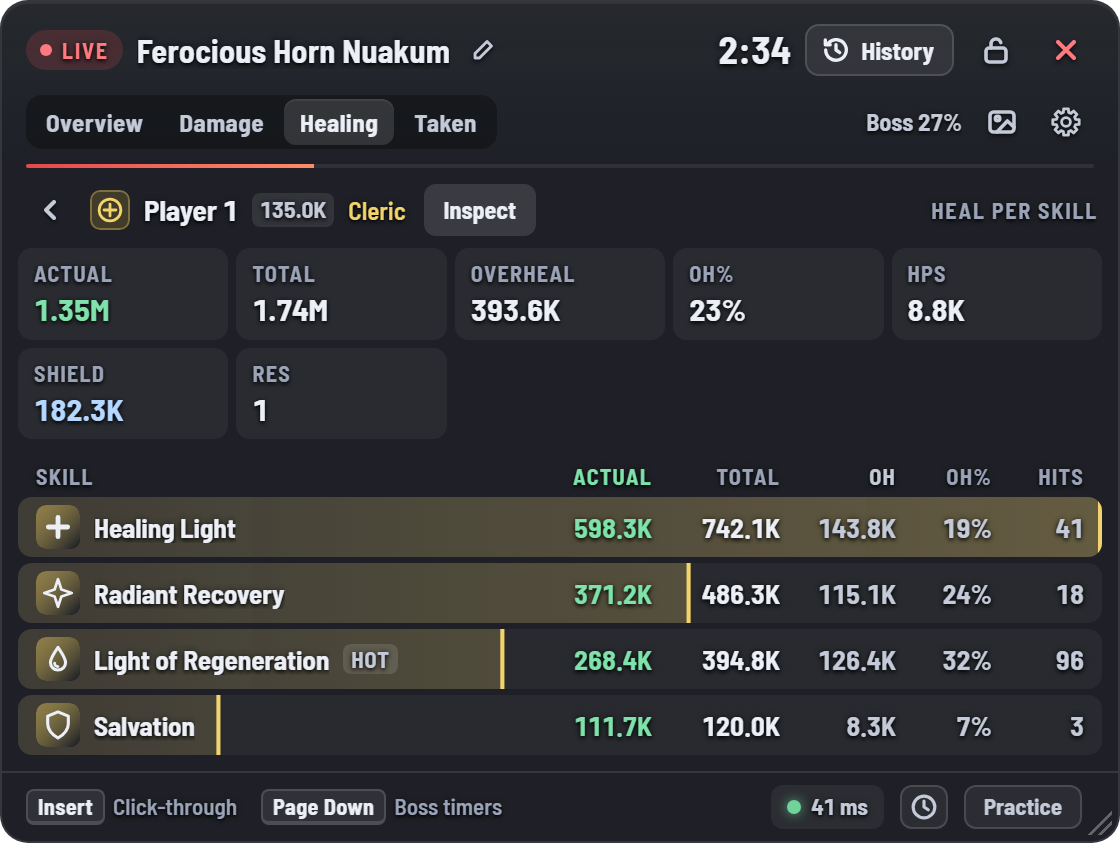
Heal per skill for a Cleric: Healing Light, Radiant Recovery, Light of Regeneration and Salvation, each with actual heal, total, overheal, overheal percent and hits
Tanks

See who took the hits

Aggro, mitigation and every attack that landed: for tanks, and for finding out who stood in what.

  • Aggro: how long the boss was on each player, and who it's on right now
  • Mitigated: blocked, evaded and soaked by shields
  • Dodges, and the perfect ones
  • Deaths, lowest HP and the biggest hit
  • Every enemy attack that landed, sorted by damage
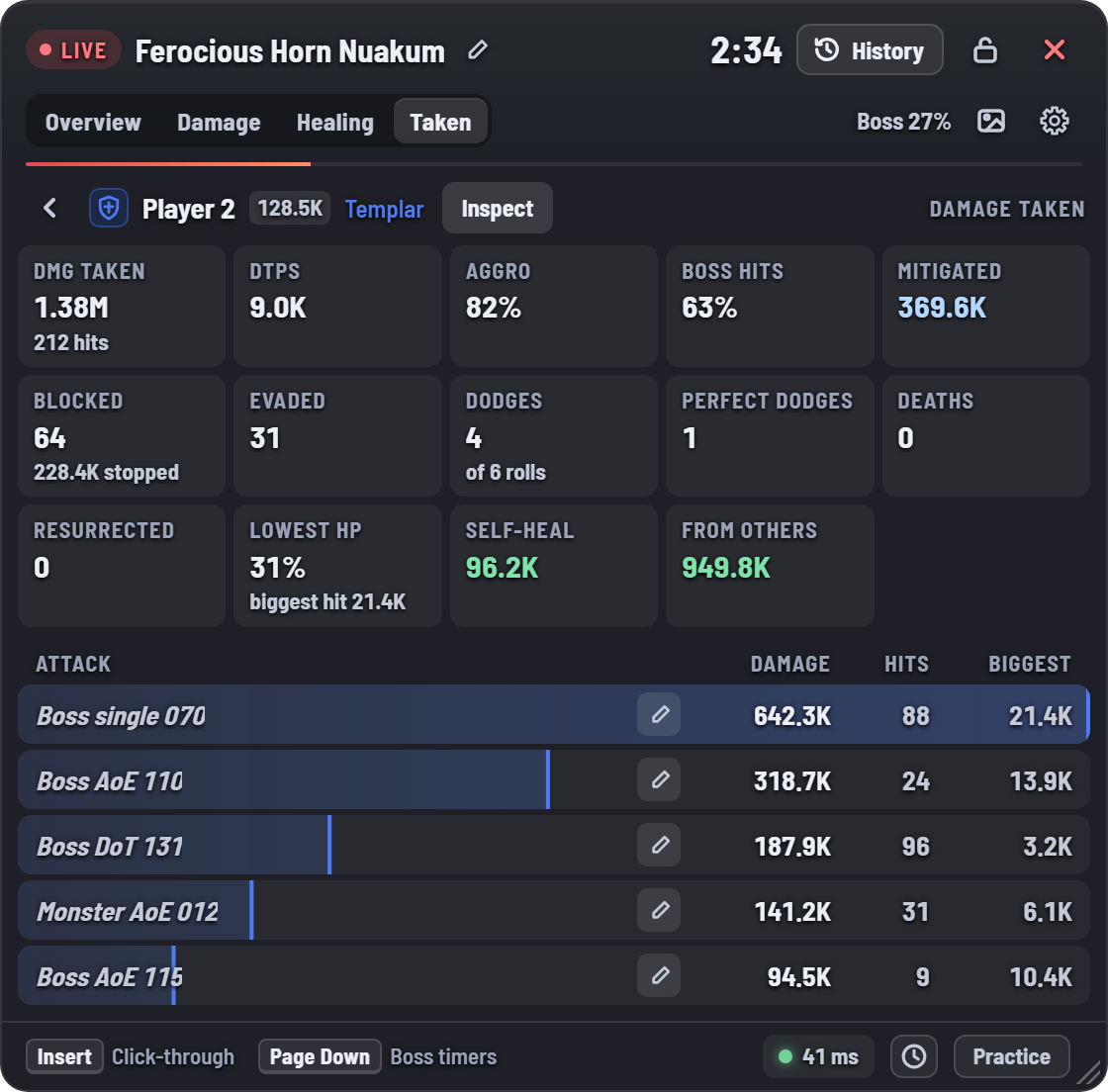
Damage taken by a Templar: damage, DTPS, aggro 82%, boss hits, mitigated, blocked, evaded, dodges, deaths, lowest HP and the boss attacks that hit them
Alerts

Never miss a boss, an event or a cube

The meter keeps watch while you play, and its alerts ring even while the overlay is hidden.

World bosses

Open the game's Field Boss panel once and the meter keeps every respawn time, shared with other Bladeglass players on your server. Pick your bosses: a horn, alarm, drums or gong rings 30, 20, 10 or 5 minutes before they spawn, and live timers show the kibelisk number to teleport to.

Shugo event

A bell 10, 5 or 1 minute before every Shugo event, with a countdown in the meter.

Hidden cubes

A sparkle the moment a hidden cube comes into view, in Altgard and Verteron, and "Cube nearby" until it's claimed.

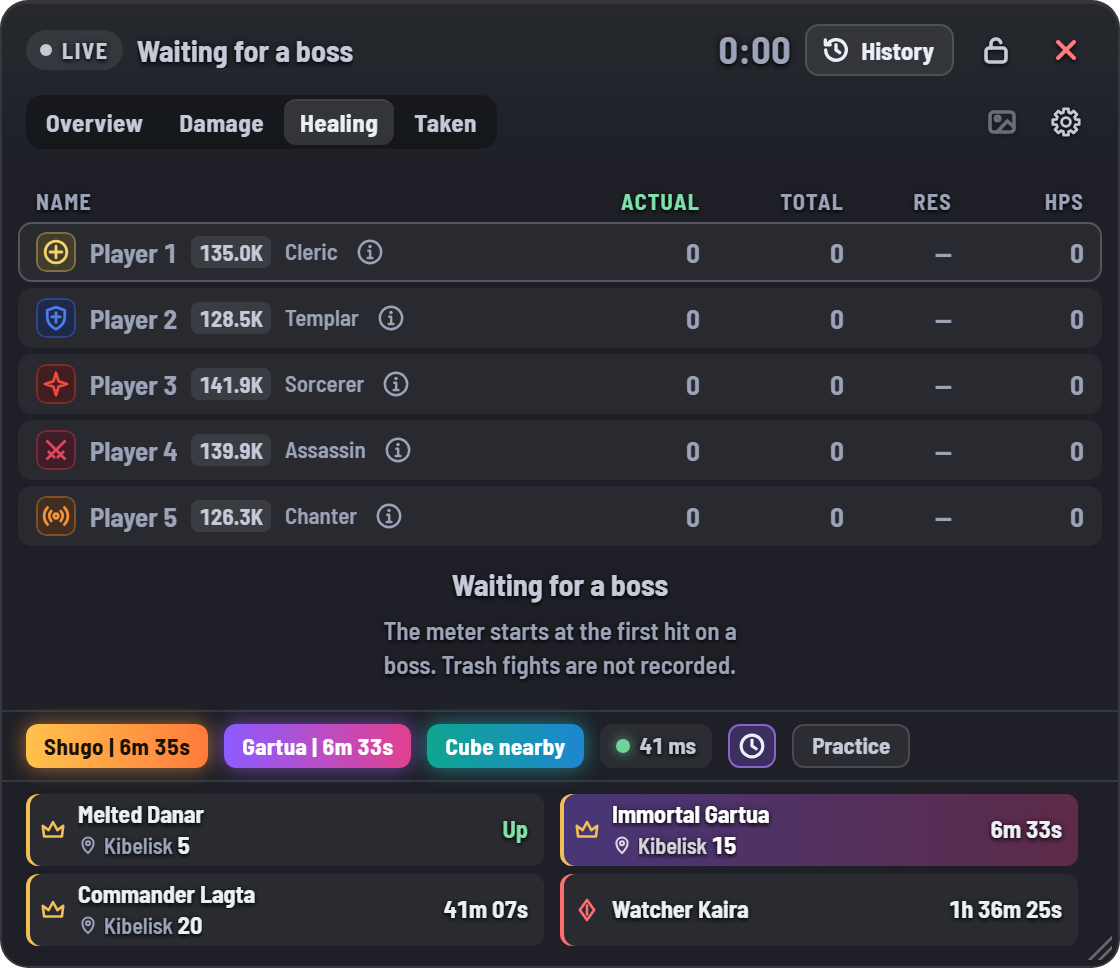
The meter while waiting for a boss: the party list, the Shugo, Gartua and hidden cube alerts, and live boss timers with kibelisk numbers
History

One fight per boss

Every boss and mini-boss is its own fight, marked Kill or Wipe and grouped by dungeon run. Trash in between is left out, and your last 50 runs stay on your PC.

  • Bosses named for you; rename any with the pencil
  • Practice mode for dummies: any target counts, every attempt saved
  • Open any earlier fight to look at it again
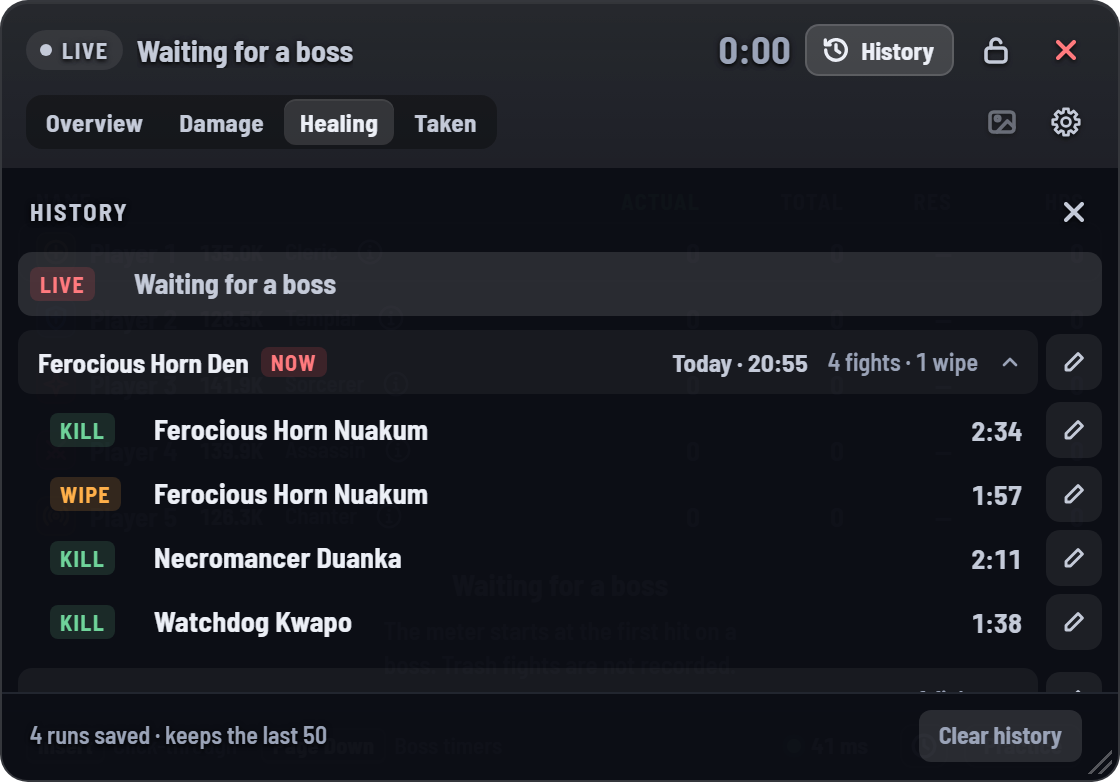
History: a Ferocious Horn Den run with four fights, three kills and one wipe, each with its duration
Export

Share the fight

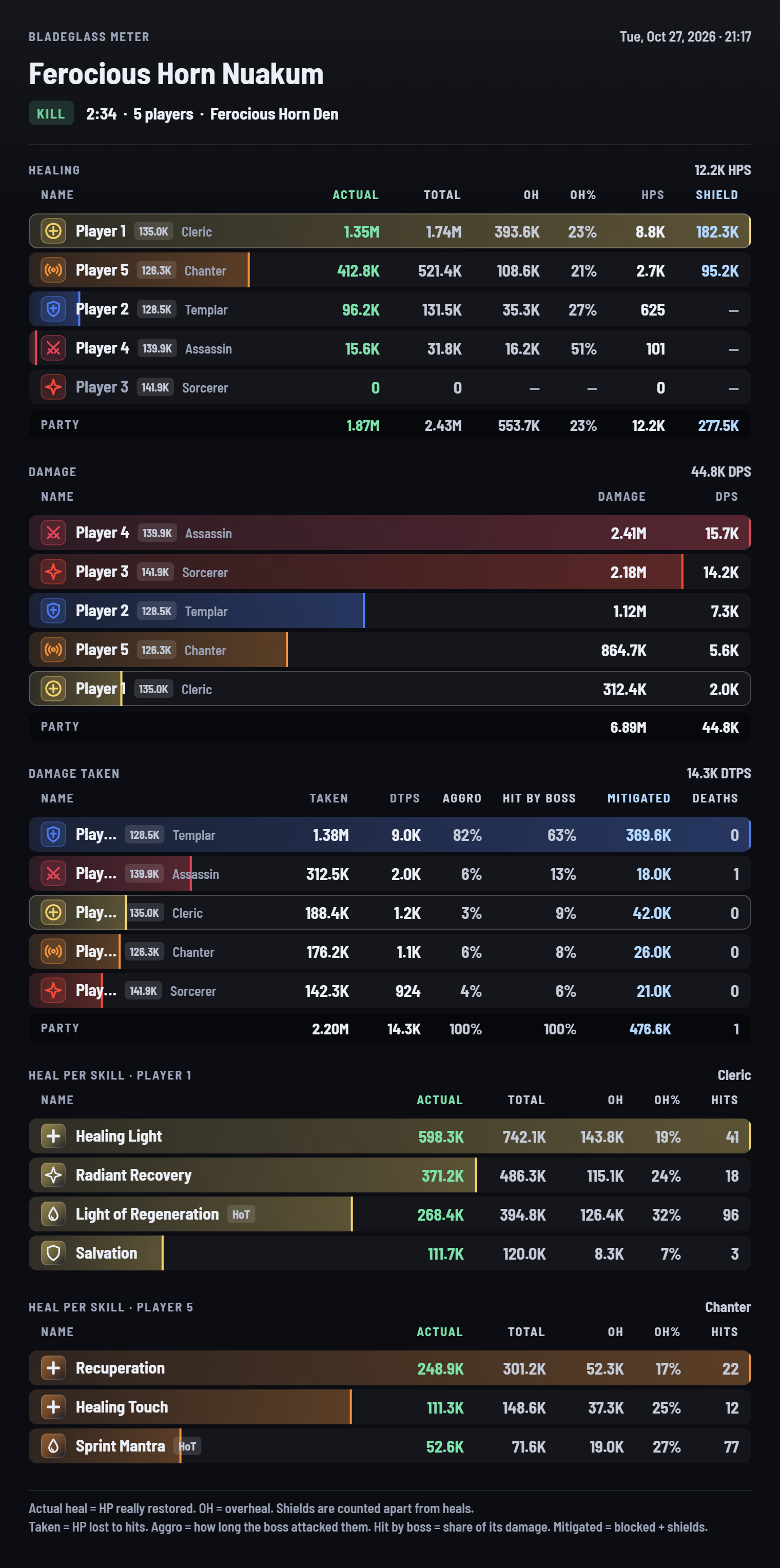
One click saves the whole fight as a picture: healing, damage, damage taken and heal per skill for the healers. It's copied too, ready to paste into Discord.

See the full image
An exported fight image with healing, damage, damage taken and heal per skill tables
And more

Small things that matter mid-fight

Click-through

Press Insert and every click goes straight to the game.

Hotkeys in game

Single keys, no Ctrl or Shift that would make you dodge. Change them in Settings.

Updates itself

New versions install on their own, never during a dungeon or boss fight.

Your ping

The game's own ping, live in the meter's footer.

Inspect

Open any party member's gear and stats on Shugo.gg in one click.

CP or Gear Score

Next to every name, your choice, and the party list before the pull.

Light mode

For slower PCs: values jump instead of gliding, for a third of the CPU.

Your size

Drag, resize, scale from 80 to 150%, and set how see-through it is.

Install

Ready in three steps

About two minutes. No account, nothing to set up.

Install Npcap

Npcap lets the meter read the game's network traffic. It's free, from the makers of Nmap.

In its installer, leave "Restrict Npcap driver's access to Administrators only" unchecked.

Get Npcap

Install Bladeglass

Run the installer. It doesn't need administrator rights.

If Windows says "Windows protected your PC", click More info, then Run anyway. That's only for the first install; updates install without it.

Download

Play

Set Aion 2 to borderless or windowed mode, since no overlay can draw over exclusive fullscreen.

Start Bladeglass Meter from the Start menu. It starts counting at the first hit on a boss.

Safe and private

Reads. Never touches.

Only reads

The meter reads the game's network traffic the way Wireshark does. It never touches the game, its files or its memory, never sends anything to the game server, and never presses a key for you.

Stays on your PC

Your fights are saved on your PC and nowhere else. The meter goes online for two things only: checking for updates, and sharing field boss times (server, boss and time; nothing about players).

Bladeglass is fan-made and not affiliated with NCSOFT. Third-party tools may be against the game's terms; use it at your own risk.

Help

If something's off

The meter says "No game traffic yet"

Check that Npcap is installed with "Restrict Npcap driver's access to Administrators only" unchecked. If not, run its installer again and untick it.

A VPN or a game booster (ExitLag, NoPing and the like) can hide the game's traffic. Try once without it.

Still stuck? Open Settings > Help > Copy details and send that to whoever shared the meter with you.

It says "Looking for your character"

The meter learns who you are when you change zone. Teleport to a kibelisk or change zone once.

Hotkeys don't work while I'm in the game

Aion 2 runs as administrator, and Windows hides its key presses from normal programs. Turn on Settings > Hotkeys > Start as administrator.

The overlay doesn't show over the game

Set the game to borderless or windowed mode. No overlay can draw over exclusive fullscreen.

My heals are a little lower than in Combat Analysis

Only class skills count as healing. Potions, gear and Arcana procs are left out, so heal totals can be a few percent below the game's.

Other players' damage shows "—" at world bosses

At world bosses the server only sends your own hits on the boss, so only your damage can be shown. In dungeons everyone's is.

How do I update?

The meter updates itself when it starts, once you're out of a dungeon or boss fight. You can also check in Settings > Updates, the first section in Settings.

Where are my fights and pictures saved?

Fights and settings: %APPDATA%\local.aion2.healmeter. Exported pictures: Pictures\Bladeglass.

What's new

Latest updates

See every version and its notes on the release page.

All versions

Ready for the next pull?

Free, for Windows 10 and 11.